OpenAI Built a Keypad for Supervising AI Agents. Here's Why We Built a Board.
OpenAI just shipped a piece of hardware. Not a phone, not a wearable: a small desk controller called Codex Micro, built with the mechanical keyboard maker Work Louder, designed for one job. It tells you what your AI coding agents are doing, and gives you physical buttons to respond.

Thirteen programmable switches. A joystick. A rotary dial. Status lights that show whether an agent is running, waiting for feedback, finished, or stuck on an error. Keys for push-to-talk, for accepting a change, for rejecting one.
Read that feature list again, because it quietly announces something bigger than a gadget: the world's most valuable AI lab believes the bottleneck in software development has moved. The hard part is no longer getting a machine to write code. The hard part is supervising the machines that do.
The frontier moved
For two years the industry has raced to make coding agents more capable. That race is largely won; agents can now work for hours unattended. Which creates a new problem, one every team running multiple agents knows intimately: you stop being a programmer and become a shift supervisor. Who is running? Who is blocked? Who finished, and can I trust what they did?
OpenAI's answer is to put that problem on your desk as four status lights and an accept/reject key. It is a genuinely clever piece of industrial design, and we mean that without irony. When a frontier lab builds dedicated hardware for watching agents work, agent supervision has officially become a product category.
This is the frontier we have been building on all along.
What a light can't tell you
A status light answers one question: is the agent busy? Every question after that needs something a keypad cannot hold.
What is the agent actually working on? What did it decide an hour ago, and why? What did the previous session leave unfinished? Which files did it touch? When it says "done", does the work on disk match the story it told? And when a new agent picks up tomorrow, how does it inherit any of this?
Those are not hardware questions. They are questions about state, context, memory and audit. Answering them takes a persistent, shared, inspectable record of the work itself.
The difference is easy to see side by side. This is the entire state a status light can carry:
agent-3 [amber] waiting
And this is the state the same moment of work actually has, as a Kanban Pro ticket on disk:
tickets/T-1784281675801.md
---
title: Migrate auth flow to session tokens
status: col_review
assignee: claude-code
modified: 2026-07-18T14:32:07Z
modifiedBy: claude-code
---
## Agent Working Notes
- [x] Refactored token issuance (src/auth/issue.ts)
- [ ] Blocked: needs a schema decision on the refresh table
- Decision, 14:20: kept HS256; rotation is handled at the gateway
Same agent, same instant. One of these survives a restart, briefs the next session, and can be audited next week.
In other words: a board.
The board is the brief
Kanban Pro is a local-first project manager where the tickets are not a to-do list bolted onto the real work. They are the working memory of every agent on the team.
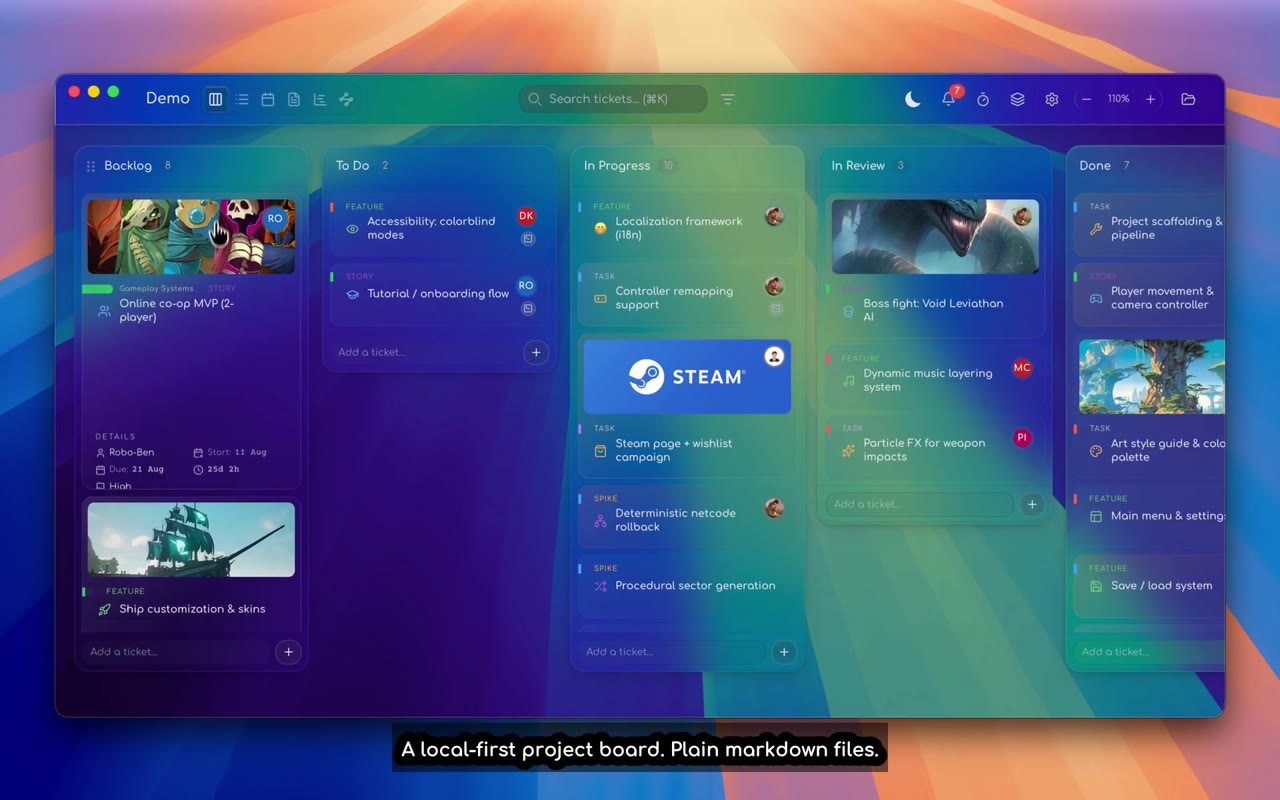
Each ticket is a plain markdown file on your machine. Agents read them natively and write them natively. Terminals live inside the tickets, so when an agent runs, it runs in the context of the work item. Before it types a single character, it has already been briefed:
.kanban/sessions/<session>/KP-CONTEXT.md
 ├─ the ticket this session is bound to
 ├─ neighbouring tickets on the board
 ├─ board columns and project rules
 ├─ the team graph: who else is working, human and agent
 └─ its own identity: KP_TICKET_ID, KP_MEMBER_ID, KP_SESSION_ID
Sessions persist: scrollback is replayable, and every edit is attributed in an activity feed that distinguishes agent changes from human ones. The supervision surface is not beside the work. It is the work.
So where Codex Micro gives you "agent 3 is waiting", the board gives you what agent 3 was doing, the decisions it recorded, the state it left behind, and the full trail of who changed what. The light tells you to look. The board is the thing you look at.
If you want the deeper technical picture, we have written about using kanban tickets as an agent memory layer and running Claude Code from kanban tickets.
Reflexes and brains
To be clear, this is not a rivalry. A keypad and a board solve different layers of the same problem, and they would work rather well together. Physical controls are reflexes: instant, ambient, zero-friction responses. A board is a brain: durable context, shared memory, accountability. Serious agent operations will want both, the same way a pilot wants both warning lights and a flight plan.
There is also a quieter limit built into hardware: a keypad is single-operator by nature. It supervises one person's agents from one desk, and its state dies there. A board is a team surface. Two genuinely different kinds of teammate, human and agent, interact through the same tickets and work toward the same goal, with every change attributed to whoever made it. That is the part no status light can carry: not watching machines, but incorporating them into the team. And because kanban is a method virtually every modern project team already runs, agents join your existing process rather than demanding a new one.
What matters is the shared conviction underneath. OpenAI has now said, in injection-moulded plastic, what we have been saying in markdown: the next era of computing is about orchestrating intelligent agents, and the tools for doing that are still being invented.
We are contributing our part to that frontier: context injection that briefs every agent on launch, session records that survive restarts, an audit layer that reconciles what an agent claims against what is actually on disk. All of it local-first, all of it in files you own, with no cloud, no accounts, and nothing leaving your machine.
The frontier is real. Bring reflexes. Bring a brain.
Kanban Pro is free in early access for macOS and Windows. Built by Factotem, a South African software company where an AI agent manages tasks, email and marketing from the same boards we sell.